No AI. No guessing. Just your numbers.

MyLabInsight is fully logic-based. It shows trends in the numbers you already have โ€” your lab results, blood pressure readings, weight, sleep, and activity โ€” without making guesses or predictions.

  • View trends across time using your actual data
  • Scroll through real app screens to see how it works
  • Explore relationships between lab results and daily metrics

Android coming January 2026

Five tabs. One simple way to understand your numbers.

What You'll Find in the App

MyLabInsight is organized into five simple tabs. Each one helps you understand different parts of your health data โ€” clearly, privately, and without AI-generated guesswork.

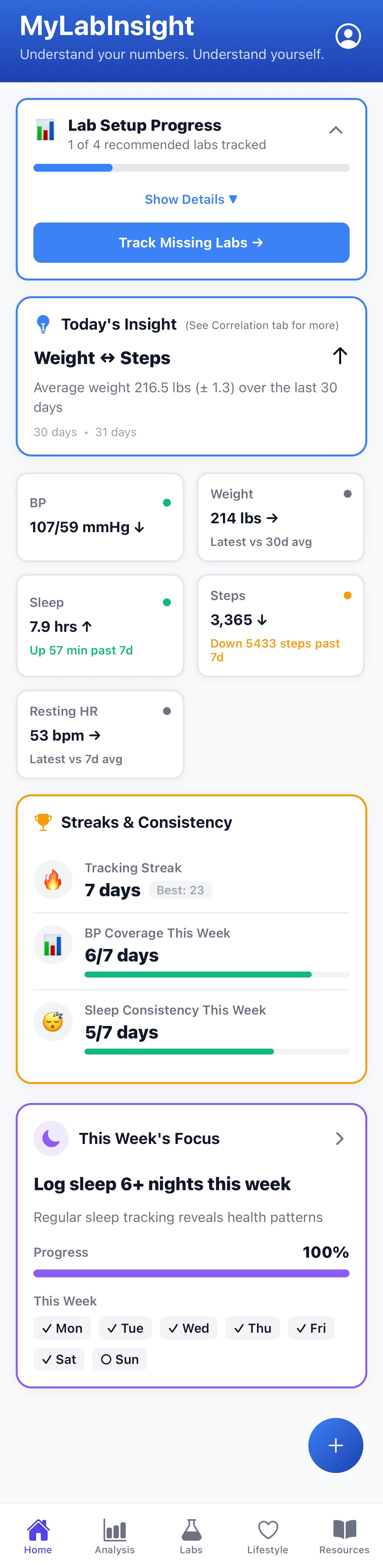
๐Ÿ  Home โ€” Your Daily Snapshot

A clean overview of your most recent data and trends:

  • Today's Insight โ€” an educational observation connecting two of your metrics
  • Recent values for blood pressure, weight, steps, sleep, RHR, HRV
  • Streaks & consistency across categories
  • This week's focus โ€” a gentle highlight area based on your tracking activity

๐Ÿ“Š Analysis โ€” Deeper Trends & Patterns

Explore your data from different angles:

  • Overview: metabolic indicators, outside-range markers, and multi-range trend charts
  • Correlations: relationships between labs and daily metrics (sleep, steps, weight, HR, HRV)
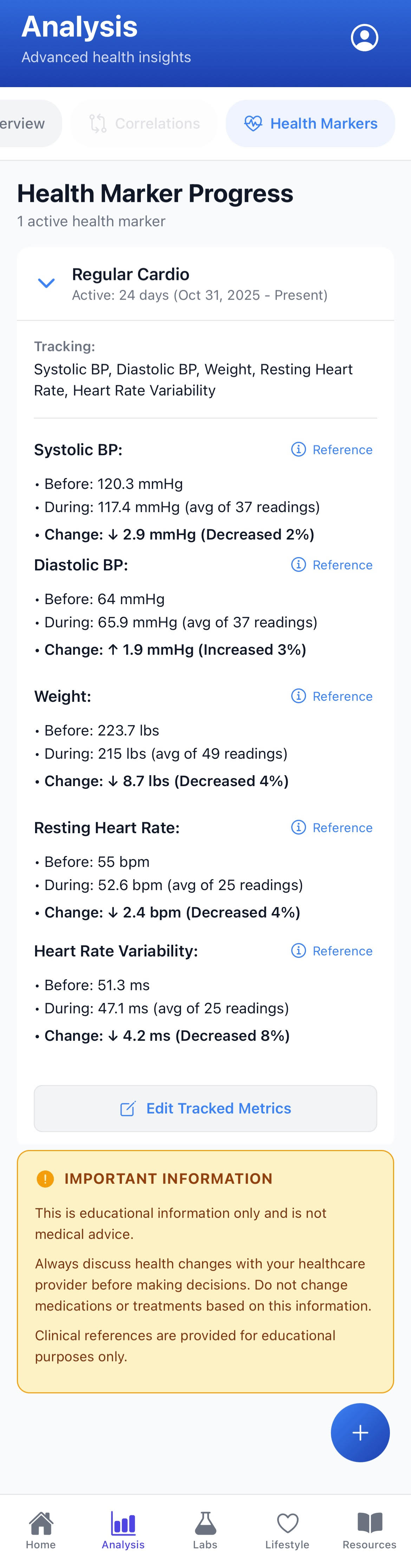
  • Health Markers: "before vs. during" comparisons showing percentage changes over specific periods

๐Ÿงช Labs โ€” Clear, Visual Lab Trends

Your lab results are shown in a clean, simple format that's easy to understand:

  • Supported markers: A1C, cholesterol panel (total, HDL, LDL, triglycerides), kidney, liver, inflammation, and more
  • Sparkline graphs: Tiny trend lines next to each lab so you can see direction at a glance
  • Individual trend pages: Date-stamped values, directional indicators (increased / decreased / stable)
  • Info panels: What the lab measures, typical reference ranges, educational context from U.S. guideline sources

(No predictions or medical advice)

๐Ÿ˜ด Lifestyle โ€” Your Daily Patterns

Track the things that influence your numbers:

  • Weight (manual or device-based depending on setup)
  • Sleep duration and patterns
  • Exercise sessions (workouts)
  • Activity (general movement or active/exercise minutes depending on device capability)
  • Health Marker (overall consistency of tracked habits)

Everything is shown with simple consistency badges so you instantly know how complete your data is.

๐Ÿ“š Resources โ€” Tools & Helpful Links

A small, growing collection of resources designed to help you track your health more easily:

  • Device and product links (smart scales, BP cuffs, trackers) that integrate well with the app

Your Health Dashboard

The Home screen provides a snapshot of your health data at a glance. Everything shown is based on your actual entered data โ€” no predictions, no AI-generated content.

What You See

  • Lab Setup Progress: Track which lab results you've entered and which are still needed to complete your profile
  • Today's Insight: A daily observation showing relationships between two metrics โ€” like how your weight trends relate to your step count over recent days
  • Health Cards: Quick-view cards displaying your most recent values for blood pressure, weight, sleep duration, and daily steps
  • Streaks & Consistency: See how consistently you're tracking your data across different health categories
  • This Week's Focus: A suggested area to pay attention to based on recent patterns in your data
MyLabInsight Home screen

Analysis Overview

The Analysis tab offers three different modes for exploring your health data. The screenshot shows Overview mode, which provides a comprehensive view of key health categories and trends.

Three Analysis Modes

  • Overview: See metabolic syndrome indicators, biomarkers outside reference ranges, and trend charts across multiple timeframes
  • Correlations: Explore relationships between lab results and daily metrics like sleep, activity, and weight
  • Health Markers: Deep-dive into individual biomarkers with detailed trend analysis and reference ranges

What Overview Mode Shows

  • Metabolic Syndrome Card: Displays which criteria are met based on clinical guidelines โ€” purely informational, not diagnostic
  • Numbers Outside Reference Range: Lists any biomarkers that fall above or below standard reference ranges, with trend indicators
  • Biomarker Trends: Interactive charts showing how your lab values change over time, with filters for different time ranges (7 days, 30 days, 90 days, 1 year, or all data)
  • Educational Info: Contextual explanations helping you understand what each metric represents
MyLabInsight Analysis Overview screen showing metabolic syndrome card, out-of-range biomarkers, and trend charts

Analysis Overview โ€” scroll to see all cards and trends

Correlation Modes

MyLabInsight automatically looks for relationships between your health metrics โ€” like how your weight, sleep, activity, and lab results relate to each other over time. All patterns are based only on your own data and displayed in clear, educational language.

Weight Correlations

See how your weight trends relate to blood pressure, sleep, heart rate, steps, and available lab results.

What You See

  • Weight trend and consistency over the selected timeframe
  • Strong Patterns when enough paired days exist
  • Early Patterns for lab metrics with fewer paired days
  • Clear ranges like "At 212โ€“217 lbs, BP averaged 117/66 mmHg"
MyLabInsight Weight Correlation view showing patterns between weight and health metrics

Weight Correlation view โ€” scroll to see all patterns and insights

Other Correlation Modes

Beyond weight, MyLabInsight helps you explore how your lifestyle patterns relate to cardiovascular, metabolic, and sleep metrics.

โค๏ธ

Cardio Correlations

Explore how sleep duration, steps, and recovery patterns relate to blood pressure, resting HR, and HRV.

๐Ÿงช

Metabolic Correlations

See how A1C, triglycerides, HDL, and LDL relate to sleep, steps, and daily lifestyle patterns.

๐Ÿ˜ด

Sleep Correlations

Learn how different sleep durations and weekly consistency relate to weight, BP, resting HR, and HRV.

๐Ÿ‘Ÿ

Activity Correlations

Discover how steps, workouts, and general activity levels relate to cardiovascular and metabolic metrics.

Health Markers

Health Markers let you choose a specific theme or area โ€” like cardio, metabolic, or activity โ€” and see how your tracked metrics have changed within that category over time.

It highlights before vs. during averages, percentage changes, and clear educational context for each metric.

MyLabInsight Health Marker view showing how tracked metrics have shifted over time

Health Marker view โ€” scroll to see how your tracked metrics have shifted over time

What Health Markers Show

๐ŸŽฏ

Track a Category

Choose a theme (such as Regular Cardio) to group metrics like systolic BP, diastolic BP, weight, resting HR, and HRV.

๐Ÿ“Š

Before vs. During Comparison

Shows the average before starting the marker period and the average during it โ€” with percentage change.

๐Ÿ“ˆ

Clear Educational Labels

Uses directional phrases like "increased," "decreased," or "changed" based on your real tracking data.

๐Ÿ“š

Clinical References

Each metric includes a reference link for educational background and context โ€” not medical advice.

What This Helps You Understand

How These Insights Work

MyLabInsight includes built-in explanations that show how each insight is calculated. These in-app panels explain how matches are found, how time windows work, and why certain patterns appear in your data.

MyLabInsight How This Works explanation panel showing pattern detection methodology

Sample "How This Works" panel โ€” available inside the app for any correlation insight.

What InfoModals Explain

๐Ÿ”—

How Matches Work

Insights only use days where both metrics were logged close enough together to be meaningful.

๐Ÿ“…

Time Windows Explained

Filters like 7, 14, or 30 days affect which matches appear, but long-term badges use your full history.

๐Ÿ’ช

Pattern Strength

More paired days = stronger, more stable patterns. Your badge never downgrades.

๐Ÿ“Š

Consistency Effects

Logging more regularly improves insight clarity, including same-day or within-day comparisons.

Recommendations

The Recommendations tab is created from the short questionnaire you complete when you first open the app. Based entirely on your personal history, family history, age, and key risk factors, it generates an evidence-based overview of suggested wellness screenings to consider reviewing with a provider.

All recommendations follow public U.S. guidelines (USPSTF, ADA, NCCN, AUA) and are for educational purposes only โ€” not medical advice.

MyLabInsight Recommendations tab showing assessment profile, risk summary, and screening suggestions

Recommendations tab โ€” scroll to see your profile, risk summary, and guideline-based screening suggestions

What the Recommendations View Includes

๐Ÿ‘ค

Assessment Profile

Age, sex assigned at birth, race/ethnicity, family history, and key health factors in one place.

โš ๏ธ

Health Risk Summary

Cardiovascular, diabetes, cancer, and smoking risk summaries based on your profile and latest labs.

โœ…

Recommended Screenings

A prioritized list of screenings labeled Recommended, Consider, or Discuss.

๐Ÿ“‹

Guideline Details

Expand any item to see guideline sources, suggested frequency ranges, and what the test is meant to detect.

๐Ÿ“

Questionnaire-Based

Recommendations are built entirely from your questionnaire responses โ€” including age, family history, lifestyle factors, and genetic risks.

๐Ÿ”„

Auto-Updating Logic

Recommendations adjust if you update your profile, add new labs, or edit your birthday.

Export for Your Healthcare Provider

You can export your full Recommendations view โ€” assessment profile, risk summary, and screening list โ€” as a clean PDF.

Many people use this as a conversation guide with their medical provider when discussing which screenings to prioritize.

PDF export is available with Premium or Health 360.

This page describes educational features only. MyLabInsight does not provide medical advice, diagnosis, or treatment recommendations. All information is for educational purposes to help you understand your health data. Always consult qualified healthcare professionals for medical decisions.